
Distributed Testing Guide
Table of Contents
Section titled “Table of Contents”- Overview
- Architecture
- Permanent Relay Setup
- Running Tests
- Relay Observability
- Test Categories
- Adding New Tests
- Troubleshooting
- File Reference
1. Overview
Section titled “1. Overview”Distributed testing validates 0k-sync across real machines, real networks, and real latency — not simulated chaos on a Docker bridge. The test infrastructure spans three machines on a WireGuard mesh:
- Server A (Mac Mini, macOS) — Test orchestrator, runs
cargo test - Server B (Linux server, 91GB RAM) — Hosts 3 relay instances in Docker
- Server C (Raspberry Pi, ARM Linux) — Edge device under test
There are two tiers of chaos tests:
| Tier | Tests | Where They Run | What They Test |
|---|---|---|---|
| Single-host Docker | 28 scenarios | Server B only | Toxiproxy-mediated chaos (latency, loss, partition) |
| Distributed | 37 scenarios | Server A -> Server B + Server C | Real multi-machine sync, relay failover, edge device behavior |
Both tiers coexist. Single-host tests use docker-compose.chaos.yml. Distributed tests use docker-compose.distributed.yml.
2. Architecture
Section titled “2. Architecture”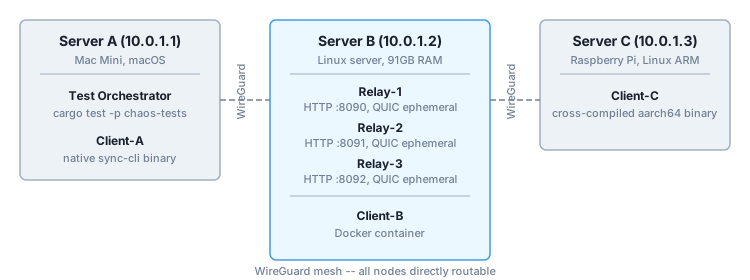
Network: WireGuard mesh. All nodes directly routable. Traffic goes over real internet (WireGuard tunnels). iroh endpoints publish via Pkarr/DNS discovery.
Key design decisions:
-
Permanent relays. The 3 relays on Server B start once and stay running. Tests connect to them, not start them. This enables rapid iteration, load testing, and cost analysis.
-
Per-test isolation via passphrase. Each test generates a unique passphrase, creating a unique sync group. Multiple tests can run against the same relays without data collision.
-
SSH orchestration. All remote commands run via
tokio::process::Commandshelling out tossh. No SSH crate needed — the mesh VPN handles authentication. -
ARM cross-compilation on Server B. Server C’s binary is cross-compiled on Server B (Linux -> ARM Linux via
cross), then SCP’d to Server C. Server A is macOS and can’t cross-compile for ARM Linux easily.
3. Permanent Relay Setup
Section titled “3. Permanent Relay Setup”3.1 Starting Relays (One-Time)
Section titled “3.1 Starting Relays (One-Time)”From Server A or any machine with SSH access to Server B:
docker compose -f tests/chaos/docker-compose.distributed.yml \ -p dist-chaos up -d --build --wait"This builds 3 relay images and starts them with:
RUST_LOG=sync_relay=debug,iroh=warn— full debug loggingNET_ADMINcapability — for tc netem chaos injection- Health checks on each relay (5s interval, 3s timeout, 5 retries)
Verify all 3 are healthy:
curl -s http://localhost:8091/health && echo && \ curl -s http://localhost:8092/health"3.2 Discovering Endpoint IDs
Section titled “3.2 Discovering Endpoint IDs”Each relay logs its iroh Endpoint ID at startup:
The test harness discovers these automatically — you only need to check manually when debugging.
3.3 Stopping Relays
Section titled “3.3 Stopping Relays” docker compose -f tests/chaos/docker-compose.distributed.yml \ -p dist-chaos down -v --remove-orphans"3.4 Rebuilding After Code Changes
Section titled “3.4 Rebuilding After Code Changes” docker compose -f tests/chaos/docker-compose.distributed.yml \ -p dist-chaos up -d --build --wait"The --build flag rebuilds the Docker images. The --wait flag blocks until all health checks pass.
4. Running Tests
Section titled “4. Running Tests”All distributed tests are annotated #[ignore = "requires distributed"] and run from Server A.
4.1 Prerequisites
Section titled “4.1 Prerequisites”- 3 relays running on Server B (see Section 3.1)
- SSH keys configured: passwordless SSH to Server B and Server C must work
- sync-cli built locally:
cargo build -p zerok-sync-cli --release - Server C binary available: The harness handles this automatically (cross-compiles on Server B, SCPs to Server C)
4.2 Run All Distributed Tests
Section titled “4.2 Run All Distributed Tests”cargo test -p chaos-tests distributed -- --ignoredThis runs all 37 distributed tests: 5 SSH primitives, 16 infrastructure tests, 16 scenario tests.
4.3 Run Specific Test Categories
Section titled “4.3 Run Specific Test Categories”# SSH primitives onlycargo test -p chaos-tests distributed::ssh -- --ignored
# Harness infrastructure testscargo test -p chaos-tests distributed::harness -- --ignored
# Multi-relay failover scenarioscargo test -p chaos-tests mr_ -- --ignored
# Cross-machine sync scenarioscargo test -p chaos-tests cm_ -- --ignored
# Edge device (Server C) scenarioscargo test -p chaos-tests edge_ -- --ignored
# Network partition & convergencecargo test -p chaos-tests net_ -- --ignoredcargo test -p chaos-tests conv_ -- --ignored4.4 Run a Single Test
Section titled “4.4 Run a Single Test”cargo test -p chaos-tests mr_01_relay_crash_failover -- --ignored4.5 Run All Chaos Tests (Single-Host + Distributed)
Section titled “4.5 Run All Chaos Tests (Single-Host + Distributed)”This only works on Server B (single-host tests require Docker):
cargo test -p chaos-tests -- --ignored4.6 Run Non-Ignored Tests (Unit Tests Only)
Section titled “4.6 Run Non-Ignored Tests (Unit Tests Only)”cargo test -p chaos-testsThis runs the pure unit tests (SSH parsing, endpoint ID extraction, etc.) without any infrastructure.
5. Relay Observability
Section titled “5. Relay Observability”5.1 Health Endpoint
Section titled “5.1 Health Endpoint”Each relay exposes /health on its HTTP port:
curl -s http://10.0.1.2:8090/health | python3 -m json.toolResponse:
{ "status": "ok", "version": "0.1.0", "connections": 3, "groups": 2, "uptime_seconds": 7200, "total_blobs": 150, "storage_bytes": 51200, "groups_with_data": 5}| Field | Meaning |
|---|---|
connections | Currently active QUIC sessions |
groups | Groups with active sessions |
uptime_seconds | Seconds since relay started |
total_blobs | Blobs stored in SQLite |
storage_bytes | Total ciphertext bytes in database |
groups_with_data | Distinct groups with stored data |
5.2 Prometheus Metrics
Section titled “5.2 Prometheus Metrics”Each relay exposes /metrics in Prometheus text format:
curl -s http://10.0.1.2:8090/metricsGauges (current state):
| Metric | Description |
|---|---|
sync_relay_connections_active | Active QUIC sessions now |
sync_relay_groups_active | Active sync groups now |
sync_relay_storage_blobs | Blobs in database now |
sync_relay_storage_bytes | Ciphertext bytes in database now |
sync_relay_storage_groups | Groups with stored data now |
sync_relay_info{version="..."} | Server version |
Counters (monotonic since startup):
| Metric | Description |
|---|---|
sync_relay_pushes_total | Total PUSH requests handled |
sync_relay_pulls_total | Total PULL requests handled |
sync_relay_connections_total | Total connections accepted |
sync_relay_bytes_received_total | Total ciphertext bytes received |
sync_relay_bytes_sent_total | Total ciphertext bytes sent |
sync_relay_blobs_stored_total | Total blobs stored since startup |
sync_relay_rate_limit_hits_total | Total rate limit rejections |
sync_relay_errors_total | Total protocol errors |
5.3 Live Logs
Section titled “5.3 Live Logs”# Follow all relay logs
# Follow a specific relay
# Last 100 lines from relay-2With RUST_LOG=sync_relay=debug, you’ll see:
- Every connection accept/close
- Every HELLO handshake (device ID, group ID, pending count)
- Every PUSH (blob ID, cursor, group, bytes)
- Every PULL (blob count, bytes, cursor range)
- Every NOTIFY delivery
- Rate limit hits
- Cleanup task activity
5.4 Comparing All 3 Relays
Section titled “5.4 Comparing All 3 Relays”Quick health dashboard:
for port in 8090 8091 8092; do echo "=== Relay on :$port ===" echodoneQuick metrics comparison:
for port in 8090 8091 8092; do echo "=== Relay :$port ===" | grep -E "^sync_relay_(pushes|pulls|bytes|connections_total|storage_bytes)" echodone6. Test Categories
Section titled “6. Test Categories”6.1 SSH Primitives (5 tests)
Section titled “6.1 SSH Primitives (5 tests)”| Test | What |
|---|---|
ssh_exec_server_b_whoami | SSH to Server B, verify user |
ssh_exec_server_b_docker_version | Docker available on Server B |
ssh_exec_server_c_whoami | SSH to Server C, verify user |
ssh_exec_nonexistent_command | Error handling for bad commands |
ssh_scp_round_trip | SCP file to Server B and back |
6.2 Harness Infrastructure (16 tests)
Section titled “6.2 Harness Infrastructure (16 tests)”| Test | What |
|---|---|
distributed_connect_to_relays | Connect to 3 permanent relays, discover Endpoint IDs |
distributed_relay_health_checks | All 3 relays respond to health checks |
distributed_server_c_binary_exists | ARM binary present on Server C |
distributed_server_c_cli_version | sync-cli runs on Server C |
distributed_server_c_init | sync-cli init works on Server C |
distributed_init_pair_a | Init and pair on Server A (local) |
distributed_init_pair_c | Init and pair on Server C (SSH) |
distributed_init_pair_b_container | Init and pair in Server B container |
distributed_push_pull_a_to_c | Server A pushes, Server C pulls, data matches |
distributed_configure_multi_relay | All clients have all 3 relay addresses |
distributed_netem_relay_latency | tc netem latency on relay container |
distributed_netem_server_c_loss | tc netem packet loss on Server C |
distributed_partition_b_c | iptables partition between machines |
distributed_heal_partition | Remove iptables partition |
6.3 Multi-Relay Failover — MR (4 tests)
Section titled “6.3 Multi-Relay Failover — MR (4 tests)”| Test | What |
|---|---|
mr_01_relay_crash_failover | Kill relay-1, verify failover to relay-2/3 |
mr_02_fan_out_all_relays | Push fan-out reaches all 3 relays |
mr_03_relay_restart_new_endpoint | Restart relay, verify new Endpoint ID |
mr_04_all_relays_down | Kill all 3, verify error, restart 1, verify recovery |
6.4 Cross-Machine Sync — CM (4 tests)
Section titled “6.4 Cross-Machine Sync — CM (4 tests)”| Test | What |
|---|---|
cm_01_a_push_c_pull | Server A pushes 10 messages, Server C pulls all 10 |
cm_02_bidirectional_sync | Server A pushes 5, Server C pushes 5, both see all 10 |
cm_03_three_way_sync | Server A + Server B + Server C all push, all see everything |
cm_04_concurrent_push_pull | 20 rapid pushes from Server A, Server C receives all |
6.5 Edge Device — EDGE (4 tests)
Section titled “6.5 Edge Device — EDGE (4 tests)”| Test | What |
|---|---|
edge_01_server_c_high_latency | 500ms + 100ms jitter on Server C |
edge_02_server_c_bandwidth_limit | 128kbps bandwidth limit on Server C |
edge_03_server_c_partition_recovery | Block Server C, push 10 msgs, unblock, catch up |
edge_04_server_c_slow_relay_fast_client | 200ms relay latency, bidirectional push/pull |
6.6 Network Partition & Convergence — NET/CONV (4 tests)
Section titled “6.6 Network Partition & Convergence — NET/CONV (4 tests)”| Test | What |
|---|---|
net_01_partition_a_b | Block Server A <-> Server B, verify error, heal, verify recovery |
net_02_selective_relay_partition | 100% loss on relay-1 only, clients fail over |
net_03_asymmetric_chaos | Relay-1: 200ms, Relay-2: 10% loss, Relay-3: clean |
conv_01_convergence_after_multi_failure | Kill relay + partition Server C + push + heal -> converge |
7. Adding New Tests
Section titled “7. Adding New Tests”7.1 Harness API
Section titled “7.1 Harness API”use crate::distributed::harness::{DistributedHarness, Machine, ChaosTarget};use crate::netem::NetemConfig;
// Connect to permanent relays (fail-fast if not running)let harness = DistributedHarness::connect().await?;
// Init and pair all 3 clients (Server A, Server B, Server C)harness.init_and_pair_all().await?;
// Push/pull from any machineharness.push(Machine::ServerA, "hello").await?;let output = harness.pull(Machine::ServerC).await?;
// Kill/restart relays (tests that modify relays must restore them)harness.kill_relay(0).await?;harness.restart_relay(0).await?;
// Chaos injection (tc netem)let netem = NetemConfig::new().delay(200).jitter(50).loss(5.0);harness.inject_netem(ChaosTarget::Relay(0), &netem).await?;harness.inject_netem(ChaosTarget::ServerC, &netem).await?;harness.clear_netem(ChaosTarget::Relay(0)).await?;
// Network partition (iptables on Server B)harness.partition("10.0.1.3", "10.0.1.2").await?;harness.heal_partition("10.0.1.3", "10.0.1.2").await?;
// Collect relay logs for zero-knowledge assertionlet logs = harness.all_relay_logs().await?;for log in &logs { let result = assert_no_plaintext_in_logs(log); assert!(result.passed);}
// Clean up client state (does NOT touch relays)harness.cleanup().await?;7.2 Test Template
Section titled “7.2 Test Template”#[tokio::test]#[ignore = "requires distributed"]async fn my_new_scenario() { let harness = DistributedHarness::connect().await.expect("connect failed");
DistributedHarness::ensure_server_c_binary() .await .expect("ensure_server_c_binary failed");
harness.init_and_pair_all().await.expect("init_and_pair_all failed");
// --- Test logic here ---
// Always clean up harness.cleanup().await.expect("cleanup failed");}7.3 Conventions
Section titled “7.3 Conventions”- All distributed tests go in
tests/chaos/src/scenarios/distributed.rs - All tests must be
#[ignore = "requires distributed"] - Tests that kill/restart relays must restore them before returning
- Tests that inject netem/iptables must clear them before returning
- Use
settle()(3s) for normal propagation delays - Use
settle_long()(10s) for chaos recovery scenarios - Unique message prefixes prevent cross-test interference (UUID per message)
8. Troubleshooting
Section titled “8. Troubleshooting””RelaysNotRunning” Error
Section titled “”RelaysNotRunning” Error”The harness checks relay health on connect. If relays aren’t running:
# Start them docker compose -f tests/chaos/docker-compose.distributed.yml \ -p dist-chaos up -d --build --wait"Port Conflicts on Server B
Section titled “Port Conflicts on Server B”# Check what's using the ports
# Kill orphaned containersSSH Failures
Section titled “SSH Failures”# Test SSH manually
# Check VPN mesh status# Check mesh VPN connectivitywg show # or equivalent mesh VPN status commandServer C Binary Not Found
Section titled “Server C Binary Not Found”The harness auto-builds and SCPs the ARM binary. If it fails:
# Manual cross-compile on Server B cd ~/0k-sync && cargo install cross 2>/dev/null || true && \ cross build --target aarch64-unknown-linux-gnu -p zerok-sync-cli --release"
# Manual SCP to Server CTests Hang
Section titled “Tests Hang”The most likely cause is a relay that’s not responding. Check health:
for port in 8090 8091 8092; do echo -n "Relay :$port — "doneIf a relay is down after a kill_relay test, restart it:
docker compose -f tests/chaos/docker-compose.distributed.yml \ -p dist-chaos up -d --wait relay-1"Stale iptables Rules
Section titled “Stale iptables Rules”If a test crashed mid-partition, clean up manually:
Stale netem Rules
Section titled “Stale netem Rules”# On a relay containerssh [email protected] "docker exec dist-chaos-relay-1-1 tc qdisc del dev eth0 root 2>/dev/null; echo done"
# On Server C9. File Reference
Section titled “9. File Reference”Test Code
Section titled “Test Code”| File | Purpose |
|---|---|
tests/chaos/src/distributed/mod.rs | Module root |
tests/chaos/src/distributed/ssh.rs | SSH execution primitives (SshTarget, exec, scp) |
tests/chaos/src/distributed/config.rs | Machine IPs, paths, ports, timeouts |
tests/chaos/src/distributed/harness.rs | DistributedHarness orchestrator |
tests/chaos/src/scenarios/distributed.rs | 16 scenario tests (MR, CM, EDGE, NET, CONV) |
Infrastructure
Section titled “Infrastructure”| File | Purpose |
|---|---|
tests/chaos/docker-compose.distributed.yml | 3-relay + client topology for Server B |
tests/chaos/Dockerfile.relay | Relay Docker image (shared with single-host tests) |
tests/chaos/Dockerfile.cli | CLI Docker image (for client container) |
Relay Observability
Section titled “Relay Observability”| Endpoint | URL (relay-1) | Format |
|---|---|---|
| Health | http://10.0.1.2:8090/health | JSON |
| Metrics | http://10.0.1.2:8090/metrics | Prometheus text |
| Logs | docker compose -p dist-chaos logs relay-1 | Text (tracing fmt) |
Machine Reference
Section titled “Machine Reference”| Machine | Mesh IP | Role |
|---|---|---|
| Server A | 10.0.1.1 | Test orchestrator (macOS) |
| Server B | 10.0.1.2 | Relay host (Linux, 91GB RAM) |
| Server C | 10.0.1.3 | Edge device (Raspberry Pi, ARM) |
See also:
- Chaos Testing Strategy — Single-host chaos testing strategy (68 scenarios)
Version: 1.0.0 | Date: 2026-02-07