
Chaos Testing Strategy
Table of Contents
Section titled “Table of Contents”- Philosophy
- Test Environment
- Chaos Toolchain
- Test Topology
- Failure Scenarios — Transport Layer
- Failure Scenarios — Encryption & Handshake
- Failure Scenarios — Sync Protocol
- Failure Scenarios — Content Layer
- Failure Scenarios — Adversarial
- Cross-Platform Chaos
- Chaos Test Automation
- Integration with CI/CD
- Metrics & Observability
- Runbook
- Development Phasing
1. Philosophy
Section titled “1. Philosophy”1.1 Why Chaos Testing for a Sync Relay
Section titled “1.1 Why Chaos Testing for a Sync Relay”0k-Sync operates in the worst possible environment for correctness: the real world. Devices go offline mid-sync. Networks drop packets. Users close laptop lids during handshakes. Mobile connections switch from WiFi to cellular. Relays restart for updates.
A sync protocol that only works on clean networks is a sync protocol that doesn’t work.
Chaos testing verifies one thing: when the world misbehaves, does 0k-Sync lose data? Everything else — performance degradation, retry delays, user-facing errors — is secondary. The invariants are:
Invariant 1: No data loss. Every blob pushed by a client must eventually be retrievable by all paired clients after chaos heals. No silent drops.
Invariant 2: No silent corruption. Every blob received must pass content-hash verification. A single bit flip is a P0.
Invariant 3: No leaked plaintext. The relay must never see, log, or store plaintext content. This is the “0k” guarantee.
Invariant 4: State convergence. After chaos heals, all paired clients must converge to identical version vectors without requiring a full re-scan. Blob presence alone is insufficient — the state markers must match.
Invariant 5: No metadata leakage. No sensitive metadata (filenames, folder structures, vault sizes, or client identifiers beyond session tokens) shall appear in relay logs at any log level, including TRACE-level crash output. Implementation note: the relay’s
tracingsubscriber must wrap sensitive fields (VaultID, BlobHash, client addresses) through a redaction layer that blinds them before they reach stdout/stderr. This is not optional filtering — it must be structural, so a developer adding a newtracing::debug!()call cannot accidentally leak metadata without explicitly opting out of redaction. Use aRedacted<T>wrapper type that implementsDisplayandDebugas[REDACTED]by default — this ensures even a generic#[derive(Debug)]on a parent struct won’t leak inner data through derived trait impls.
1.2 TDD Integration
Section titled “1.2 TDD Integration”Every chaos scenario follows the same pattern:
- Spec the failure — Define the exact condition (e.g., “relay dies 50ms into a blob push”)
- Write the assertion — What must be true after recovery? (e.g., “blob eventually arrives intact on all paired devices”)
- Automate the chaos — Script the failure injection
- Run until proven — Not once. Hundreds of times. Flaky passes are failures.
Chaos tests are not exploratory. They are automated, repeatable, and part of the test suite. They live in tests/chaos/ and run on the dedicated test server.
1.3 Scope Boundaries
Section titled “1.3 Scope Boundaries”This document covers chaos testing of the 0k-Sync protocol and its components. It does not cover:
- Application-level testing (CashTable, VardKista Suite) — those projects own their own chaos strategies
- Tauri framework testing — covered by separate verification
- Load/performance testing — separate document (future)
- Penetration testing — separate engagement (future)
2. Test Environment
Section titled “2. Test Environment”2.1 Dedicated Test Server
Section titled “2.1 Dedicated Test Server”All chaos testing runs on a dedicated high-memory server (96GB RAM, multi-core) with sufficient resources to simulate a full adversarial network locally.
Why not CI? Chaos tests are:
- Resource-intensive — dozens of containers, network namespaces, and virtual interfaces running simultaneously
- Time-intensive — meaningful chaos requires sustained operation, not 5-minute CI jobs
- Nondeterministic by design — need many iterations to catch timing-dependent bugs
CI runs the deterministic unit and integration tests. The dedicated server runs the chaos.
2.2 Resource Budget
Section titled “2.2 Resource Budget”Target allocation for a full chaos run:
| Resource | Allocation | Purpose |
|---|---|---|
| RAM | 32GB (of 96GB available) | Containers, VMs, test data |
| CPU | 8 cores | Parallel test topologies |
| Disk | 50GB scratch (NVMe) | Blob storage, logs, captures |
| Network | Isolated Docker networks | No interference with production |
This leaves 64GB RAM and remaining cores free for other services during chaos runs. If a full-matrix run needs more, schedule it during off-hours.
I/O note: The 50GB scratch space must be on NVMe, not spinning disk. When running Swarm topologies (20+ clients), I/O wait on slow disk will mask the network chaos latency being injected, producing misleading results. The bottleneck for large topologies is I/O, not RAM.
2.3 Isolation
Section titled “2.3 Isolation”Chaos tests must never affect real infrastructure:
- All test containers run in dedicated Docker networks (
0ksync-chaos-*) - No port bindings to the host network (container-to-container only)
- Test data uses generated keys, never production credentials
- Cleanup script runs after every session:
scripts/chaos-cleanup.sh
3. Chaos Toolchain
Section titled “3. Chaos Toolchain”3.1 Tool Selection
Section titled “3.1 Tool Selection”| Tool | Role | Why This One |
|---|---|---|
| Docker Compose | Topology definition | Declarative, reproducible, already in stack |
| tc (traffic control) | Network degradation (latency, jitter, loss, reorder) | Kernel-level, precise, no overhead |
| Toxiproxy | Application-level fault injection (timeouts, slow close, bandwidth limits) | Sits between nodes as a proxy, programmable API |
| Pumba | Container-level chaos (kill, pause, stop, remove) | Docker-native, scriptable |
| cargo-nextest | Test runner | Parallel execution, retry support, JUnit output |
| tracing + OpenTelemetry | Observability during chaos | Already in 0k-Sync architecture |
3.2 Why Not Chaos Mesh / Litmus?
Section titled “3.2 Why Not Chaos Mesh / Litmus?”Chaos Mesh and Litmus are Kubernetes-native. 0k-Sync chaos testing runs on bare Docker on a single machine. The toolchain above is simpler, has no k8s dependency, and gives more precise control over network conditions. If 0k-Sync ever needs multi-host chaos testing (e.g., geo-distributed relays), revisit Chaos Mesh at that point.
3.3 Toxiproxy as the Central Chaos Router
Section titled “3.3 Toxiproxy as the Central Chaos Router”Toxiproxy is the key enabler. Every connection between clients and relays routes through a Toxiproxy instance, giving programmatic control over the connection mid-test:

Toxiproxy toxics available:
| Toxic | Effect | Use Case |
|---|---|---|
latency | Add fixed + jitter delay | Simulate mobile/satellite links |
bandwidth | Limit throughput | Simulate congested networks |
slow_close | Delay connection close | Simulate half-open connections |
timeout | Stop data after delay | Simulate network partitions |
slicer | Fragment data into small chunks | Stress framing/reassembly |
limit_data | Close after N bytes | Simulate mid-transfer disconnection |
These can be added, modified, and removed via HTTP API during test execution — no container restarts needed.
4. Test Topology
Section titled “4. Test Topology”4.1 Base Topology
Section titled “4.1 Base Topology”The minimum chaos topology simulates a real-world sync scenario:
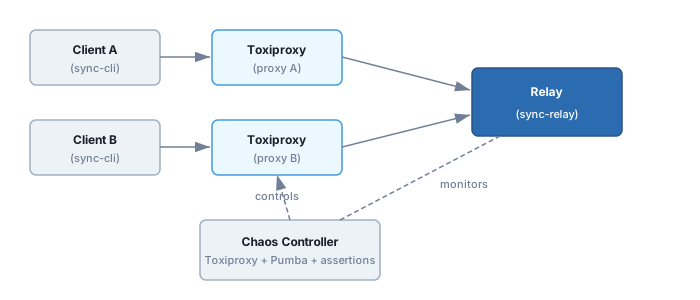
All components are Docker containers on an isolated network. The chaos controller is the test harness — a Rust binary or script that orchestrates the scenario.
4.2 Docker Compose Template
Section titled “4.2 Docker Compose Template”services: relay: build: context: . dockerfile: Dockerfile.relay networks: - chaos-net
toxiproxy: image: ghcr.io/shopify/toxiproxy:latest networks: - chaos-net
client-a: build: context: . dockerfile: Dockerfile.cli depends_on: [toxiproxy, relay] networks: - chaos-net
client-b: build: context: . dockerfile: Dockerfile.cli depends_on: [toxiproxy, relay] networks: - chaos-net
networks: chaos-net: driver: bridge internal: true # No external access4.3 Scaled Topologies
Section titled “4.3 Scaled Topologies”| Topology | Clients | Relays | Purpose |
|---|---|---|---|
| Pair | 2 | 1 | Basic sync correctness |
| Multi-device | 5 | 1 | Fan-out sync, conflict resolution |
| Multi-relay | 4 | 2-3 | Relay failover and fan-out (Phase 6.5) |
| Swarm | 20 | 1 | Connection limits, resource exhaustion |
Start with Pair for alpha. Scale to Multi-device at beta. Swarm for RC/GA stress validation.
4.4 Multi-Relay Chaos Scenarios (Phase 6.5)
Section titled “4.4 Multi-Relay Chaos Scenarios (Phase 6.5)”These scenarios test client-side fan-out and failover across multiple independent relays. All fan-out logic is in the client — relays have no awareness of each other.
| ID | Scenario | Setup | Expected Behaviour |
|---|---|---|---|
| MR-1 | Primary relay killed during active push | 2 relays, kill primary after HELLO | Client connect fails over to secondary relay, push completes there |
| MR-2 | Secondary relay killed | 2 relays, kill secondary during fan-out | Client reports primary ack success, logs warning about secondary failure |
| MR-3 | All relays killed | 2 relays, kill both | Client returns AllRelaysFailed, sync is offline until relays recover |
| MR-4 | Relay flapping (up/down/up) | 1 relay, toggle availability | Client reconnects on next operation, per-relay cursor resumes correctly |
| MR-5 | Primary relay high latency | 2 relays, inject 5s latency on primary | Secondary fan-out push completes fast, primary push completes eventually |
Pre-requisites for MR scenarios:
- Client configured with 2+ relay addresses
- Each relay running independently with own SQLite
- Per-relay cursor tracking enabled in client
MR-1 detail: The client attempts HELLO/Welcome on the primary relay. If the connection fails (relay killed), the client tries the next relay in preference order. Once connected, the push proceeds normally. The test verifies:
- Connect failover fires within timeout
- Push completes on secondary
- Per-relay cursor is tracked for the secondary relay (not the dead primary)
MR-3 detail: When all relays are unreachable, the client must fail gracefully — not hang, not panic. ClientError::AllRelaysFailed is returned. The caller can retry later with exponential backoff.
MR-4 detail: Relay flapping tests cursor resilience. After reconnect, the client resumes pulling from the last known cursor for that relay. No duplicate data, no missed data (within TTL window).
5. Failure Scenarios — Transport Layer
Section titled “5. Failure Scenarios — Transport Layer”These test iroh’s transport behaviour under degraded conditions.
5.1 Latency & Jitter
Section titled “5.1 Latency & Jitter”| ID | Scenario | Injection | Assertion |
|---|---|---|---|
| T-LAT-01 | Fixed 200ms latency | tc qdisc add dev eth0 root netem delay 200ms | Sync completes. Blob hashes match. |
| T-LAT-02 | High jitter (200ms +/- 150ms) | tc ... delay 200ms 150ms distribution normal | Sync completes. No reordering corruption. |
| T-LAT-03 | Asymmetric latency (fast up, slow down) | Toxiproxy: 10ms upstream, 500ms downstream | Sync completes in both directions. |
| T-LAT-04 | Satellite simulation (600ms + 50ms jitter) | tc ... delay 600ms 50ms | Handshake completes. Blobs transfer. Timeouts appropriate. |
5.2 Packet Loss
Section titled “5.2 Packet Loss”| ID | Scenario | Injection | Assertion |
|---|---|---|---|
| T-LOSS-01 | 5% random packet loss | tc ... loss 5% | Sync completes (retries handle it). |
| T-LOSS-02 | 20% packet loss | tc ... loss 20% | Sync completes or fails gracefully with retryable error. No corruption. |
| T-LOSS-03 | Burst loss (10% with 25% correlation) | tc ... loss 10% 25% | No data corruption. Recovery after burst. |
| T-LOSS-04 | 100% loss (partition) then recovery | Toxiproxy: timeout toxic on, wait 30s, remove | Client reconnects. Sync resumes from last checkpoint. No duplicate data. |
5.3 Connection Events
Section titled “5.3 Connection Events”| ID | Scenario | Injection | Assertion |
|---|---|---|---|
| T-CONN-01 | Relay crash mid-sync | Pumba: kill relay container during blob push | Client detects disconnection. Retries on reconnect. Blob arrives intact. |
| T-CONN-02 | Client crash mid-push | Pumba: kill client-a during push | Relay cleans up partial state. Client-b unaffected. Client-a resumes on restart. |
| T-CONN-03 | Network partition (both clients online, relay unreachable) | Toxiproxy: timeout on both proxy paths | Both clients detect partition. No split-brain. Sync resumes when partition heals. |
| T-CONN-04 | Rapid reconnect cycle (10 connect/disconnect in 5s) | Script: connect, push 1 blob, disconnect, repeat | No connection leak. No state corruption. Relay handles gracefully. |
| T-CONN-05 | Half-open connection (client thinks connected, relay doesn’t) | Toxiproxy: slow_close + kill client TCP keepalive | Relay times out stale session. Client detects on next operation. Clean reconnect. |
5.4 Bandwidth Constraints
Section titled “5.4 Bandwidth Constraints”| ID | Scenario | Injection | Assertion |
|---|---|---|---|
| T-BW-01 | 56kbps (edge network) | Toxiproxy: bandwidth limit 7KB/s | Small blobs sync (slowly). Large blobs time out gracefully or succeed with patience. |
| T-BW-02 | Bandwidth drop mid-transfer | Toxiproxy: start at 1MB/s, drop to 10KB/s at 50% | Transfer completes or retries. No corruption of partial data. |
| T-BW-03 | Asymmetric bandwidth (fast client A, slow client B) | Different Toxiproxy bandwidth per client | Both eventually sync. Relay doesn’t block fast client waiting for slow one. |
6. Failure Scenarios — Encryption & Handshake
Section titled “6. Failure Scenarios — Encryption & Handshake”These test the hybrid Noise handshake (clatter: ML-KEM-768 + X25519) and session encryption (XChaCha20-Poly1305) under adversarial conditions.
6.1 Handshake Disruption
Section titled “6.1 Handshake Disruption”| ID | Scenario | Injection | Assertion |
|---|---|---|---|
| E-HS-01 | Disconnect after handshake message 1 (-> e) | Toxiproxy: limit_data after first message | Handshake times out. Clean retry. No partial key material leaked. |
| E-HS-02 | Disconnect after handshake message 2 (<- e, ee, s, es) | Toxiproxy: limit_data after second message | Handshake fails cleanly. No session established. Retry succeeds. |
| E-HS-03 | Disconnect after handshake message 3 (-> s, se) | Toxiproxy: limit_data after third message | One side thinks established, other doesn’t. Detect mismatch. Renegotiate. |
| E-HS-04 | Extreme latency during handshake (5s per message) | Toxiproxy: latency 5000ms | Handshake completes if timeout is sufficient. If not, clean timeout error. |
| E-HS-05 | Handshake message reorder | Toxiproxy: slicer + latency to reorder | Noise Protocol rejects out-of-order. No state corruption. |
| E-HS-06 | Concurrent handshake from same client (race) | Two simultaneous connection attempts | Exactly one succeeds. No resource leak from the failed attempt. |
6.2 Session Encryption Under Stress
Section titled “6.2 Session Encryption Under Stress”| ID | Scenario | Injection | Assertion |
|---|---|---|---|
| E-ENC-01 | Message corruption (bit flip in ciphertext) | Toxiproxy custom toxic or network tap | XChaCha20-Poly1305 AEAD rejects. No plaintext exposed. Connection reset or message retry. |
| E-ENC-02 | Message truncation | Toxiproxy: limit_data mid-encrypted-message | Decryption fails (tag mismatch). Clean error. No partial plaintext. |
| E-ENC-03 | Message duplication (replay) | Capture and replay a valid encrypted message | Nonce tracking rejects the replay. No state change from replayed message. |
| E-ENC-04 | High-volume encryption (1000 messages/sec) | Load generator + latency | No nonce reuse. No encryption errors under load. Memory stable. |
| E-ENC-05 | Key renegotiation under load | Trigger rekey during active blob transfer | Transfer survives renegotiation. No plaintext gap between old and new keys. |
6.3 Post-Quantum Specific
Section titled “6.3 Post-Quantum Specific”| ID | Scenario | Injection | Assertion |
|---|---|---|---|
| E-PQ-01 | ML-KEM encapsulation with corrupted ciphertext | Inject bit error into KEM ciphertext | Decapsulation fails. Handshake aborts cleanly. Fallback to retry (not to non-PQ). |
| E-PQ-02 | Large handshake messages (ML-KEM-768 ~1.5KB per direction) | Combine with T-BW-01 (56kbps) | Handshake completes even on slow links. Timeout appropriate for PQ message sizes. |
| E-PQ-03 | ML-KEM + X25519 hybrid — one component fails | Mock: force X25519 to fail during hybrid combine | Entire handshake fails. Does NOT fall back to ML-KEM-only or X25519-only. Hybrid is all-or-nothing. The hybrid combine must be a cryptographic binding (concatenated shared secrets fed into a single KDF), not a logical AND — neither component secret can be recoverable if the other is compromised. Downgrade check: if KDF is HKDF-SHA256, verify the relay cannot negotiate or force the client into a single-component key derivation path. The test must confirm that the session key is always derived from `HKDF(SS_kem |
| E-PQ-04 | Hybrid binding verification | Extract both KEM and ECDH shared secrets independently; verify combined session key cannot be derived from either alone | Session key requires both components. Compromising X25519 alone or ML-KEM alone yields nothing usable. |
| E-PQ-05 | Clock skew between client and relay | faketime or container clock offset: client 5 minutes ahead/behind relay | If Noise sessions or tokens use timestamps/TTLs, handshake still succeeds within skew tolerance. If skew exceeds tolerance, clean rejection with actionable error (not a cryptic timeout). |
7. Failure Scenarios — Sync Protocol
Section titled “7. Failure Scenarios — Sync Protocol”These test the 0k-Sync protocol logic — state machine, blob exchange, and eventual consistency.
Architectural note: 0k-Sync uses content-addressed immutable blobs. The relay is a dumb pipe — it stores encrypted blobs and has no knowledge of their contents. There is no conflict resolution at the protocol level because there are no conflicts: every blob is unique (identified by hash) and immutable. Merge semantics (LWW, CRDT, or otherwise) are the responsibility of the application layer (CashTable, VardKista Journal, etc.). What 0k-Sync guarantees is that all blobs reach all paired clients and that version vectors converge.
7.1 Sync State Machine
Section titled “7.1 Sync State Machine”| ID | Scenario | Injection | Assertion |
|---|---|---|---|
| S-SM-01 | Disconnect during PUSH state | Kill connection while client is pushing | Client resumes push on reconnect. No duplicate blobs on relay. |
| S-SM-02 | Disconnect during PULL state | Kill connection while client is pulling | Client resumes pull. Partial blob discarded (hash won’t match). Full blob re-pulled. |
| S-SM-03 | Disconnect during state reconciliation | Kill connection during version vector exchange | No state corruption. Reconciliation restarts cleanly. |
| S-SM-04 | Rapid state transitions (push -> pull -> push) | Automated client rapidly alternating | State machine handles transitions. No stuck states. |
7.2 Concurrent Operations
Section titled “7.2 Concurrent Operations”| ID | Scenario | Injection | Assertion |
|---|---|---|---|
| S-CONC-01 | Simultaneous push from 2 clients (same vault) | Both clients push different blobs at same time | Both blobs eventually present on both clients. No lost writes. Version vectors identical after sync settles. |
| S-CONC-02 | Push from A while B is pulling | Interleave push and pull timing | Both operations complete. B gets A’s new data on next sync cycle. |
| S-CONC-03 | 5 clients syncing simultaneously | Scale topology to 5 clients, all active | All clients converge to same state. No client left behind. |
| S-CONC-04 | Client syncs with stale state (offline for 1000 versions) | Client A pushes 1000 times while B is offline. B reconnects. | B catches up fully. No truncation. Transfer is efficient (only missing data). |
7.3 State Convergence
Section titled “7.3 State Convergence”State convergence goes beyond blob presence. After chaos heals, all clients must agree on the complete state — version vectors, blob manifests, and collection metadata — without requiring a full re-scan.
| ID | Scenario | Injection | Assertion |
|---|---|---|---|
| S-CONV-01 | Convergence after partition heal | T-LOSS-04 partition scenario, then verify state | Version vectors on Client A and Client B are byte-identical after sync settles. No full re-scan triggered. |
| S-CONV-02 | Convergence after relay restart | Pumba: restart relay, both clients reconnect | Clients re-establish state from relay. Version vectors match pre-restart state. No regression. |
| S-CONV-03 | Convergence after asymmetric chaos | Client A has 200ms latency, Client B has 20% loss, both active for 5 minutes | After chaos removed and sync settles, version vectors identical. All blobs present on both. |
| S-CONV-04 | Convergence verification method | No chaos — clean sync of 100 blobs | Verify assert_state_converged() helper works: compares version vectors, blob manifests, and collection completeness. This validates the test tooling itself. |
7.3 Blob Integrity
Section titled “7.3 Blob Integrity”| ID | Scenario | Injection | Assertion |
|---|---|---|---|
| S-BLOB-01 | Large blob (100MB) under chaos | Combine 200ms latency + 5% loss + blob push | Blob arrives intact. Hash verification passes. |
| S-BLOB-02 | Many small blobs (10,000 x 1KB) rapid fire | Push all blobs in tight loop | All 10,000 arrive. No deduplication errors. No ordering issues. |
| S-BLOB-03 | Identical blob from two clients | Both clients push same content simultaneously | Single blob stored (content-addressed dedup). Both clients see it. |
| S-BLOB-04 | Empty blob edge case | Push a zero-byte blob | Handled correctly. Not rejected, not confused with “no data.” |
8. Failure Scenarios — Content Layer
Section titled “8. Failure Scenarios — Content Layer”These test iroh-blobs content-addressed storage under failure.
8.1 Storage Failures
Section titled “8.1 Storage Failures”| ID | Scenario | Injection | Assertion |
|---|---|---|---|
| C-STOR-01 | Relay disk full during blob write | Mount tmpfs with size limit, fill it | Relay returns clear error. Client retries later. No partial/corrupt blob on disk. |
| C-STOR-02 | Client disk full during blob pull | Same technique on client container | Client reports error. Can retry after space freed. Relay unaffected. |
| C-STOR-03 | Corrupt blob on relay disk (bit rot) | Modify stored blob file after write | Hash verification fails on read. Client rejects. Relay should self-heal or flag. |
| C-STOR-04 | Relay restart with cold cache | Pumba: restart relay, client immediately requests | Relay recovers from disk. Blob served correctly (iroh-blobs handles this). |
8.2 Content Collection Integrity
Section titled “8.2 Content Collection Integrity”| ID | Scenario | Injection | Assertion |
|---|---|---|---|
| C-COLL-01 | Partial collection sync (some blobs missing) | Kill connection after 3 of 10 blobs in collection | Client knows collection is incomplete. Resumes from blob 4 on reconnect. |
| C-COLL-02 | Blob deletion during active sync | Delete blob from relay while client is pulling | Client gets clean error for missing blob. No crash. |
9. Failure Scenarios — Adversarial
Section titled “9. Failure Scenarios — Adversarial”These simulate active attackers, not just unreliable networks.
9.1 Protocol-Level Attacks
Section titled “9.1 Protocol-Level Attacks”| ID | Scenario | Injection | Assertion |
|---|---|---|---|
| A-PROTO-01 | Modified relay (tampers with encrypted blobs) | Custom relay binary that flips bits in stored blobs | Clients detect tampering via hash verification. Reject corrupted data. Alert/log. |
| A-PROTO-02 | Replay of old encrypted messages | Capture and re-inject previous session messages | Nonce/counter tracking rejects. No state rollback. |
| A-PROTO-03 | Client impersonation (stolen identity key) | Second client using same static key | Noise Protocol detects (KK pattern requires mutual authentication). Session rejected or flagged. |
| A-PROTO-04 | Relay tries to read content | Instrument relay to log all blob plaintexts | All logged content is ciphertext. Zero plaintext exposure. (This is the “0k” guarantee.) |
| A-PROTO-05 | Message injection (attacker sends fabricated messages) | Raw socket sends crafted bytes to relay port | Relay rejects: invalid framing, failed decryption, or unknown session. No crash. |
9.2 Resource Exhaustion
Section titled “9.2 Resource Exhaustion”| ID | Scenario | Injection | Assertion |
|---|---|---|---|
| A-RES-01 | Connection flood (1000 simultaneous handshakes) | Script opening connections without completing handshake | Relay applies backpressure or connection limits. Existing sessions unaffected. Rate-limiting verification: confirm the relay correctly triggers per-IP connection rate limiting (or integration point for external tools like Fail2Ban). Log output must include the offending IP and rejection reason without leaking session metadata. |
| A-RES-02 | Memory exhaustion (huge messages) | Send oversized messages exceeding protocol limits | Relay enforces max message size at the framing layer before full buffering — rejects on size header, not after reading the entire payload into memory. No OOM. |
| A-RES-03 | Slowloris (open connections, send data very slowly) | Toxiproxy: extreme bandwidth limit on attacker connection | Relay times out slow connections. Doesn’t block connection pool for legitimate clients. QUIC note: with iroh’s QUIC transport, traditional TCP Slowloris tools may behave differently. The test must also target QUIC stream limits specifically — verify the relay enforces per-connection stream caps and doesn’t hang on stalled QUIC streams. Test the QUIC path thoroughly — verify the relay enforces stream caps and handles stalled streams correctly. |
| A-RES-04 | Storage flood (push endless blobs) | Client pushes blobs in infinite loop | Relay enforces per-vault or per-connection storage quota. Rejects when limit hit. |
| A-RES-05 | Entropy exhaustion under load | High-concurrency handshakes (50 simultaneous) while stressing /dev/urandom via background dd if=/dev/urandom reads | Nonce generation never blocks or returns predictable values. Handshakes complete (possibly slower). No crypto operation falls back to weak randomness. |
9.3 Deep Inspection Tooling
Section titled “9.3 Deep Inspection Tooling”For adversarial scenarios, standard container logs may not reveal the failure. Use OS-level instrumentation:
| Tool | Purpose | Scenarios |
|---|---|---|
strace | Trace system calls on relay process | T-CONN-04 (file descriptor leaks), A-RES-02 (buffer allocation patterns) |
eBPF (bpftrace) | Kernel-level network and I/O tracing | A-RES-01 (connection tracking), T-CONN-05 (half-open detection) |
ss -tnp | Socket state snapshots | Any connection-related scenario — verify no CLOSE_WAIT accumulation |
10. Cross-Platform Chaos
Section titled “10. Cross-Platform Chaos”10.1 Why Cross-Platform Matters
Section titled “10.1 Why Cross-Platform Matters”0k-Sync targets Linux, macOS, Windows, iOS, and Android via Tauri. The protocol must behave identically regardless of the client’s OS. Subtle differences in TCP stack behaviour, file system semantics, and timing can cause platform-specific bugs that only appear under stress.
10.2 VM-Based Cross-Platform Testing
Section titled “10.2 VM-Based Cross-Platform Testing”Run on the dedicated server using lightweight VMs (not full containers — need real OS networking stacks):
| VM | OS | Purpose |
|---|---|---|
| vm-linux | Ubuntu 24.04 | Reference platform (matches CI) |
| vm-macos | macOS (Virtualization.framework if available, else skip) | Apple-specific networking |
| vm-windows | Windows 11 | Windows TCP/Winsock behaviour |
10.3 Cross-Platform Chaos Scenarios
Section titled “10.3 Cross-Platform Chaos Scenarios”| ID | Scenario | Setup | Assertion |
|---|---|---|---|
| X-PLAT-01 | Linux client <-> Windows client, 500ms latency, 20% loss | vm-linux + vm-windows + tc | Both clients sync. Encryption renegotiation holds. |
| X-PLAT-02 | macOS client with aggressive sleep (lid close simulation) | vm-macos + Pumba pause/unpause | Client recovers on wake. Sync resumes. No stale session. |
| X-PLAT-03 | Mixed OS clients, relay restart | 3 VMs + relay restart | All three clients reconnect and converge. |
| X-PLAT-04 | Windows file locking during blob write | vm-windows + concurrent file access | Client handles OS-level lock contention gracefully. No data corruption from “file in use” errors. Windows-specific: sync-client must open blob files with `FILE_SHARE_READ |
10.4 Pragmatic Scoping
Section titled “10.4 Pragmatic Scoping”Cross-platform VM testing is expensive and slow. Prioritise:
- Always: Linux-to-Linux chaos (containerised, fast, covers protocol logic)
- Beta: Add Windows VM testing — highest platform-specific risk. Windows file locking semantics (mandatory locking, “file in use” errors) differ fundamentally from POSIX advisory locks. X-PLAT-04 frequently reveals bugs that Linux and macOS never encounter. Prioritise this in beta when real users on Windows will be running CashTable.
- RC: Full matrix including macOS if VM support is viable
- Mobile: Defer to device-farm testing or manual verification (Tauri mobile lifecycle is a separate concern)
11. Chaos Test Automation
Section titled “11. Chaos Test Automation”11.1 Test Harness Architecture
Section titled “11.1 Test Harness Architecture”The chaos test harness is a Rust binary that orchestrates Docker, Toxiproxy, and Pumba:
tests/chaos/├── src/│ ├── main.rs # Test runner entry point│ ├── topology.rs # Docker Compose management│ ├── toxiproxy.rs # Toxiproxy HTTP API client│ ├── pumba.rs # Pumba command wrapper│ ├── assertions.rs # Sync state verification helpers│ └── scenarios/│ ├── transport.rs # Section 5 scenarios│ ├── encryption.rs # Section 6 scenarios│ ├── sync.rs # Section 7 scenarios│ ├── content.rs # Section 8 scenarios│ └── adversarial.rs # Section 9 scenarios├── docker-compose.chaos.yml├── Dockerfile.relay├── Dockerfile.cli└── Cargo.toml11.2 Scenario Definition Pattern
Section titled “11.2 Scenario Definition Pattern”Each scenario follows a consistent structure:
/// T-LOSS-04: 100% packet loss (partition) then recovery#[chaos_test]async fn partition_then_recovery() -> ChaosResult {    // ARRANGE: Start topology, push initial data, verify sync    let topo = Topology::pair().start().await?;    topo.client_a.push_blob(test_blob()).await?;    topo.wait_for_sync().await?;
    // ACT: Inject chaos    topo.toxiproxy_a.add_toxic("timeout", json!({"timeout": 0})).await?;    topo.toxiproxy_b.add_toxic("timeout", json!({"timeout": 0})).await?;
    // Client A pushes during partition    topo.client_a.push_blob(partition_blob()).await?;
    // Wait, then heal partition    sleep(Duration::from_secs(30)).await;    topo.toxiproxy_a.remove_toxic("timeout").await?;    topo.toxiproxy_b.remove_toxic("timeout").await?;
    // ASSERT: Sync recovers    topo.wait_for_sync_timeout(Duration::from_secs(60)).await?;    assert_blob_present(&topo.client_b, partition_blob().hash()).await?;    assert_no_data_loss(&topo).await?;
    Ok(())}
11.3 Iteration Strategy
Section titled “11.3 Iteration Strategy”Chaos tests are probabilistic. A single pass means nothing. Each scenario runs multiple iterations:
| Scenario Type | Iterations | Rationale |
|---|---|---|
| Transport (deterministic chaos) | 10 | tc-based, fairly reproducible |
| Encryption (timing-dependent) | 50 | Handshake races need many attempts to catch |
| Sync protocol (state-dependent) | 25 | State machine paths need coverage |
| Adversarial | 10 | More about correctness than timing |
| Cross-platform | 5 | Expensive, but each run is meaningful |
A scenario passes only if all iterations pass. One failure in 50 is a bug, not noise.
11.4 Reporting
Section titled “11.4 Reporting”Each chaos run produces:
- JUnit XML — Parsed by CI and workstation dashboards
- Chaos log — Full timeline of injections and observations
- Failure captures — On assertion failure: container logs, Toxiproxy state, network captures (tcpdump) saved to
chaos-results/{run-id}/
12. Integration with CI/CD
Section titled “12. Integration with CI/CD”12.1 Where Chaos Runs
Section titled “12.1 Where Chaos Runs”| Environment | What Runs | Trigger |
|---|---|---|
| Dedicated server | Full chaos suite (all scenarios, all iterations) | Nightly cron or manual |
| CI (GitHub Actions) | Smoke chaos (3 key scenarios, 1 iteration each) | PR merge to main |
| Dev workstation | Analysis of chaos results, trend tracking | Post-run |
12.2 CI Smoke Chaos
Section titled “12.2 CI Smoke Chaos”Three representative scenarios run in CI as a sanity check (not a substitute for full chaos):
- T-LOSS-02 — 20% packet loss, sync completes
- E-HS-01 — Handshake disruption, clean retry
- S-CONC-01 — Concurrent push, no lost writes
These run in a lightweight Docker topology within GitHub Actions (2 clients + 1 relay + 1 Toxiproxy). Target: <10 minutes.
12.3 Release Gate Integration
Section titled “12.3 Release Gate Integration”From the release strategy quality gates:
| Milestone | Chaos Requirement |
|---|---|
| Alpha | CI smoke chaos passes |
| Beta | Full transport + encryption chaos passes on server |
| RC | Full chaos suite passes (all sections, all iterations) |
| GA | Full chaos + cross-platform chaos passes |
12.4 Nightly Runs
Section titled “12.4 Nightly Runs”# cron: 0 2 * * * (2 AM daily)cd /opt/0k-sync && ./scripts/chaos-run.sh \ --all --iterations default \ --output /data/chaos-results/$(date +%Y%m%d)Results reviewed next morning. Any failure blocks the day’s development until investigated.
13. Metrics & Observability
Section titled “13. Metrics & Observability”13.1 What to Measure During Chaos
Section titled “13.1 What to Measure During Chaos”| Metric | Collection | Purpose |
|---|---|---|
| Sync completion time | Client logs | Detect performance regression under chaos |
| Handshake success rate | Client + relay logs | Encryption resilience |
| Blob integrity (hash match rate) | Client assertions | The primary invariant |
| Connection retry count | Client logs | Detect retry storms |
| Memory usage (relay) | docker stats | Detect leaks under sustained chaos |
| Open file descriptors (relay) | /proc/{pid}/fd count | Detect connection leaks |
| Nonce counter progression | Encryption layer instrumentation | Detect nonce reuse risk |
13.2 Baseline Establishment
Section titled “13.2 Baseline Establishment”Before running chaos, establish baselines on a clean network:
- Sync time for 1MB blob (2 clients, clean LAN)
- Handshake completion time
- Memory steady-state after 1000 sync cycles
Chaos results are compared against baselines. Acceptable degradation thresholds:
| Metric | Clean Baseline | Acceptable Under Chaos | Failure |
|---|---|---|---|
| Sync completion | X ms | <= 10X ms | > 10X or timeout |
| Handshake time | Y ms | <= 5Y ms | > 5Y or failure |
| Memory growth | 0 (steady) | <= 10% growth over 1hr | > 10% (leak) |
| Blob integrity | 100% | 100% | < 100% (CRITICAL) |
Note: blob integrity has no acceptable degradation. 100% or it’s a P0 bug.
13.3 Dashboards
Section titled “13.3 Dashboards”Dev workstation tracks chaos trends over time. Key views:
- Pass rate per scenario — trend over nightly runs (catch regressions early)
- Sync time under chaos — box plot per scenario (detect performance drift)
- Resource consumption — relay memory/CPU during chaos (catch leaks)
14. Runbook
Section titled “14. Runbook”14.1 Running the Full Chaos Suite
Section titled “14.1 Running the Full Chaos Suite”# On the dedicated servercd /opt/0k-sync
# Pull latestgit pull origin main
# Build chaos test imagesdocker compose -f tests/chaos/docker-compose.chaos.yml build
# Run all scenarioscargo nextest run -p chaos-tests --no-capture
# Or run a specific sectioncargo nextest run -p chaos-tests -E 'test(/^transport/)'cargo nextest run -p chaos-tests -E 'test(/^encryption/)'cargo nextest run -p chaos-tests -E 'test(/^sync/)'cargo nextest run -p chaos-tests -E 'test(/^adversarial/)'14.2 Running a Single Scenario
Section titled “14.2 Running a Single Scenario”# Run T-LOSS-04 specifically, 50 iterationscargo nextest run -p chaos-tests \ -E 'test(partition_then_recovery)' -- --iterations 5014.3 Cleanup After Failure
Section titled “14.3 Cleanup After Failure”If a chaos run fails or is interrupted, containers may be left running:
docker compose -f tests/chaos/docker-compose.chaos.yml down -vdocker network prune -f --filter "label=project=0ksync-chaos"docker volume prune -f --filter "label=project=0ksync-chaos"14.4 Investigating Failures
Section titled “14.4 Investigating Failures”When a chaos test fails:
- Check
chaos-results/{run-id}/for captured logs and network traces - Look at Toxiproxy state at time of failure — what toxics were active?
- Check relay container logs for panics or unexpected errors
- Check client container logs for the specific assertion that failed
- Reproduce with
--iterations 1andRUST_LOG=tracefor detailed output - If timing-dependent, add the scenario to the “flaky watch” list and increase iterations
14.5 Adding a New Scenario
Section titled “14.5 Adding a New Scenario”- Identify the failure mode (what goes wrong in the real world?)
- Write the assertion first (what must be true after recovery?)
- Implement the chaos injection (Toxiproxy toxic, Pumba action, or custom)
- Add to the appropriate section in
tests/chaos/src/scenarios/ - Run 50 iterations on the dedicated server to validate reliability
- Add to the scenario table in this document
- If it should be in CI smoke, add to the CI workflow
15. Development Phasing: When to Write Chaos Tests
Section titled “15. Development Phasing: When to Write Chaos Tests”Cross-reference: The implementation plan includes chaos deliverables in each phase’s validation gate and checkpoint, matching the phase-by-phase mapping below.
15.1 Principle: Assertions First, Infrastructure Second, Topology Last
Section titled “15.1 Principle: Assertions First, Infrastructure Second, Topology Last”Chaos tests follow the same TDD discipline as everything else in 0k-Sync: write the assertion before you write the thing it tests. A chaos scenario’s assertion (“after 200ms latency heals, all blobs must be present on both clients”) is a resilience requirement. Writing it early forces you to design for recovery from the start.
What you do NOT do is dump all 68 scenarios as a single sprint after the code is “done.” By then it’s too late — the architecture has already baked in assumptions that chaos testing would have caught.
15.2 Phase-by-Phase Chaos Authoring
Section titled “15.2 Phase-by-Phase Chaos Authoring”| Impl Phase | Chaos Work | What’s Runnable |
|---|---|---|
| Phase 1-2 (sync-types, sync-core) | Build chaos harness skeleton: Docker Compose templates, Toxiproxy Rust wrapper, chaos controller scaffold, assertion helpers (blob integrity checker, version vector convergence comparator). No scenarios yet — there’s no network code to break. | Harness compiles, helper functions have their own unit tests. |
| Phase 3 (sync-client + clatter) | Write E-HS-*, E-ENC-*, E-PQ-* scenario assertions against a mock transport. Inject chaos at the crypto layer (corrupt handshake bytes, truncate messages, reorder). These test the encryption logic, not the network. Also stub out T-* scenario signatures with #[ignore] — they need a relay to actually run. | Encryption chaos runs in-process (no Docker). cargo test -p chaos-tests -E 'test(/^encryption/)' executes against mocks. Transport stubs compile but are skipped. |
| Phase 3.5 (sync-content) | Write S-BLOB-* assertions (hash verification after transfer), C-STOR-* stubs (disk full, bit rot). These test the content pipeline in isolation using mock storage backends. | Content chaos runs in-process. |
| Phase 4 (sync-cli) | The CLI becomes the chaos test client driver. Write S-SM-*, S-CONC-* scenario logic using the CLI as the programmable client. Still can’t run full topology without a relay — but the scenario logic and assertions are complete. | Scenario logic compiles. Integration needs Phase 6. |
| Phase 6 (sync-relay) | This is where the full suite lights up. Wire all existing stubs and mocks to real Docker topology. Transport scenarios (T-*) go live. Adversarial scenarios (A-PROTO-*, A-RES-*) get implemented. Cross-platform (X-PLAT-*) follows when VM infrastructure is ready. Run every scenario 50 iterations on the dedicated server. | Full chaos suite operational. Nightly runs begin. |
15.3 What Gets Written When — Scenario Mapping
Section titled “15.3 What Gets Written When — Scenario Mapping”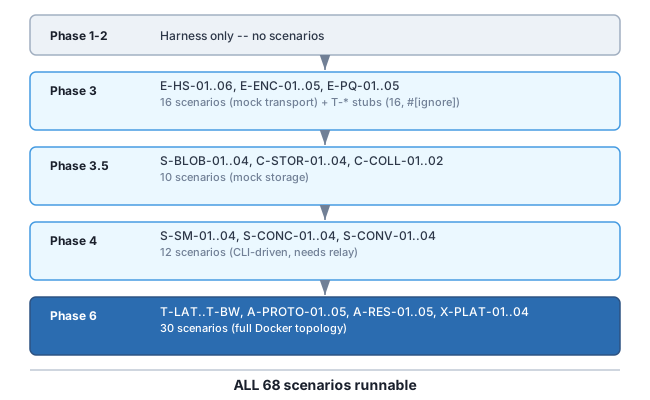
15.4 Mock vs Real Topology Boundary
Section titled “15.4 Mock vs Real Topology Boundary”The dividing line is simple: if the scenario tests logic, mock the transport. If the scenario tests the network, use Docker.
Encryption chaos (E-*) can run entirely in-process because you’re testing “what happens when bytes are corrupted between handshake messages” — you don’t need TCP to corrupt bytes. A mock transport that injects bit flips is faster, more deterministic, and more debuggable than Toxiproxy doing the same thing through Docker.
Transport chaos (T-*) must use real Docker topology because the whole point is testing the actual TCP/QUIC stack’s behavior under network degradation. You cannot meaningfully mock “200ms latency with 150ms jitter” — you need tc netem or Toxiproxy acting on real socket connections.
Adversarial chaos (A-*) must use real topology because you’re testing the relay’s behavior as a running process under attack conditions.
15.5 Graduation: Mock -> Real
Section titled “15.5 Graduation: Mock -> Real”When Phase 6 lands and the full topology is available, encryption scenarios that previously ran against mocks should ALSO run against the real topology. This catches integration-level issues that mocks miss (buffer sizes, timeout interactions, flow control under real QUIC).
The mock versions stay — they run in CI (fast, no Docker needed). The real topology versions run on the dedicated server (slow, full fidelity). Both must pass.
CI (every PR): Mock-based encryption + sync chaos → <5 minServer (nightly): Full Docker topology, all 68 → ~2 hrsAppendix A: Scenario ID Reference
Section titled “Appendix A: Scenario ID Reference”| Prefix | Section | Count |
|---|---|---|
| T-LAT | Transport: Latency & Jitter | 4 |
| T-LOSS | Transport: Packet Loss | 4 |
| T-CONN | Transport: Connection Events | 5 |
| T-BW | Transport: Bandwidth | 3 |
| E-HS | Encryption: Handshake | 6 |
| E-ENC | Encryption: Session | 5 |
| E-PQ | Encryption: Post-Quantum | 5 |
| S-SM | Sync: State Machine | 4 |
| S-CONC | Sync: Concurrent Operations | 4 |
| S-CONV | Sync: State Convergence | 4 |
| S-BLOB | Sync: Blob Integrity | 4 |
| C-STOR | Content: Storage | 4 |
| C-COLL | Content: Collections | 2 |
| A-PROTO | Adversarial: Protocol | 5 |
| A-RES | Adversarial: Resource Exhaustion | 5 |
| X-PLAT | Cross-Platform | 4 |
| Total | 68 scenarios |
Version: 1.5.0 | Date: 2026-02-03