
Multi-Agent Setup
A single AI instance hits limits. Context windows fill up. Long sessions degrade quality. One machine cannot be optimised for every task. Multi-agent setups solve this by specialising instances across machines, each doing what it does best.
Why multi-agent
Section titled “Why multi-agent”| Single instance limitation | Multi-agent solution |
|---|---|
| Context window fills up on large codebases | Specialised instances only load relevant context |
| No delegation — one instance does everything | Heavy tasks go to powerful machines, precision work stays local |
| No review — the instance that wrote code validates it | Separate instance reviews with fresh context |
| Session degradation — quality drops over long sessions | Fresh instances pick up handoffs cleanly |
| Single point of failure | Work continues on other instances if one session breaks |
Architecture patterns
Section titled “Architecture patterns”Pattern 1: Single machine, multiple instances
Section titled “Pattern 1: Single machine, multiple instances”The simplest multi-agent setup. Multiple AI sessions on the same machine, each focused on a different concern.
Machine A├── Instance 1: Frontend development├── Instance 2: Backend development└── Instance 3: Testing and reviewWhen to use: Small teams, early adoption, single-project work.
Limitation: All instances share the same hardware resources. No delegation to more powerful machines.
Pattern 2: Multiple machines, specialised roles
Section titled “Pattern 2: Multiple machines, specialised roles”Each machine is optimised for its role. Development happens on a workstation with good tooling. Heavy compute happens on a server with more memory and CPU.
Workstation (Dev)          Server (Compute)├── Development            ├── Containers├── Testing                ├── Build pipelines└── Prototyping            ├── Inference                           └── Deployment
Low-power device (Monitor)├── Security scanning├── Dependency tracking└── Uptime monitoring
When to use: Teams with heterogeneous hardware. Projects that require both precision development and heavy compute.
Pattern 3: External + internal split
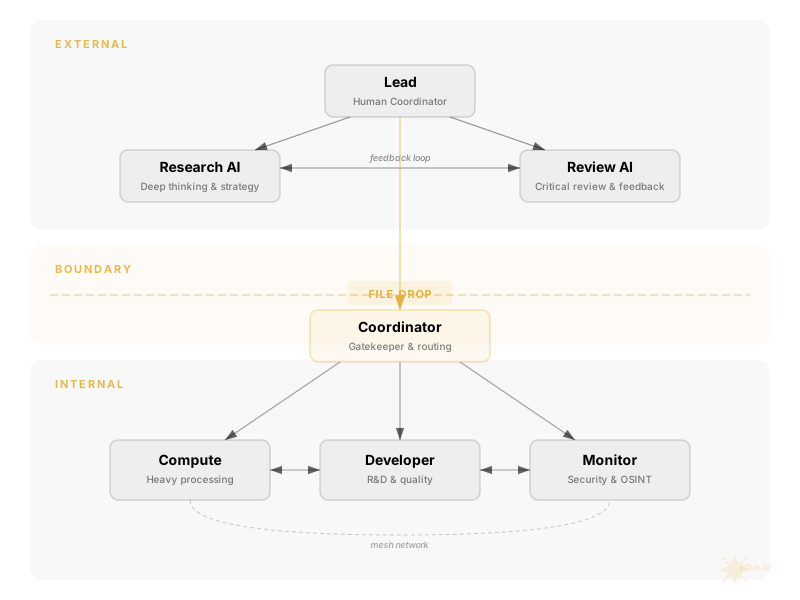
Section titled “Pattern 3: External + internal split”Research and documentation happen on external AI services (web-based chat, different model providers). Implementation happens on internal machines with access to code and infrastructure.
EXTERNAL─────────────────────────External AI Service├── Deep research├── Architecture review├── Strategy documents─────────────────────────BOUNDARY─────────────────────────INTERNAL├── Coordinator (routes work)├── Developer (implements)├── Compute (builds/deploys)└── Monitor (watches)When to use: When you want to leverage different AI architectures for different tasks. External services may have different capabilities, knowledge, or reasoning approaches than local CLI tools.
Key requirement: A clear boundary and coordination protocol between external and internal. See the Handoff Protocol for file-based coordination patterns.
Machine specialisation
Section titled “Machine specialisation”Match machine capabilities to role requirements:
| Machine type | Suited for | Why |
|---|---|---|
| High-memory server (64GB+) | Containers, inference, builds, embedding generation | Compute-bound tasks need RAM and CPU |
| Development workstation | Code logic, testing, prototyping, documentation | Needs good tooling, editor integration, fast iteration |
| Low-power always-on device | Monitoring, security scanning, scheduled tasks | Must run 24/7, low resource overhead |
| External AI service | Research, review, strategy, second opinions | Different model, different perspective, no infrastructure access |
Resource delegation
Section titled “Resource delegation”The development workstation should not attempt every task. Knowing when to delegate is a sign of a well-configured system.
Keep on the development machine:
- Code logic and structure
- Unit and integration testing (within resource limits)
- Prototyping and experimentation
- Documentation and specification work
- Code review and analysis
Delegate to compute server:
- Large compilation or build jobs
- Container orchestration
- Local inference that exceeds comfortable memory
- Embedding generation at scale
- Database operations on large datasets
- Anything that causes heavy swap usage
Delegate to monitoring device:
- Continuous security scanning
- Dependency vulnerability tracking
- Uptime checks and alerting
- Log analysis and anomaly detection
Coordination patterns
Section titled “Coordination patterns”Shared repository as source of truth
Section titled “Shared repository as source of truth”The simplest coordination mechanism. All instances work against the same git repository. Commits, branches, and pull requests become the communication channel.
| Advantage | Limitation |
|---|---|
| Familiar tooling (git) | Requires all machines to have repo access |
| Built-in history and audit trail | Not suitable for non-code handoffs |
| Branching for parallel work | Merge conflicts with concurrent work |
| Works with existing CI/CD | Latency between push and pull |
File-based handoffs
Section titled “File-based handoffs”For work that does not fit into git commits — specifications, research findings, status updates — use structured file handoffs with a naming convention.
Format: [PRIORITY]-[FROM]-[TO]-[PROJECT]-[DESCRIPTION].[ext]
P1-RESEARCHER-DEVELOPER-auth-security-spec.mdP2-DEVELOPER-COMPUTE-api-build-ready.mdP3-MONITOR-COORDINATOR-weekly-status.mdSee the Handoff Protocol for the full naming convention, templates, and examples.
Mesh networking
Section titled “Mesh networking”For teams with multiple internal machines, a mesh VPN (such as Tailscale, ZeroTier, or WireGuard) provides direct machine-to-machine connectivity without exposing services to the public internet.
| Benefit | Detail |
|---|---|
| Direct SSH between machines | No port forwarding or public IPs |
| Private DNS | Machines addressable by name |
| Encrypted by default | All traffic encrypted in transit |
| Works across networks | Machines can be in different locations |
The gatekeeper pattern
Section titled “The gatekeeper pattern”At 3+ instances, direct communication between every pair becomes unwieldy. The gatekeeper pattern introduces a coordinator instance that routes work.
External Input │ ▼ Coordinator ┌──┼──┐ ▼ ▼ ▼ Dev Compute MonitorThe coordinator’s job:
- Receive incoming work from external sources or the human lead
- Determine which specialist should handle it
- Route the work with appropriate context
- Track status and ensure nothing falls through
- Relay results back to the requester
The coordinator does not do the work. It ensures the right instance does.
Practical setup checklist
Section titled “Practical setup checklist”Step 1: Inventory your machines
Section titled “Step 1: Inventory your machines”| Machine | CPU | RAM | Storage | Always-on? | Best suited for |
|---|---|---|---|---|---|
| [Name] | [Spec] | [Spec] | [Spec] | Yes/No | [Role] |
Step 2: Assign roles
Section titled “Step 2: Assign roles”Map each machine to a role based on its capabilities. See the Role Cards guide for writing role definitions.
Step 3: Establish connectivity
Section titled “Step 3: Establish connectivity”- Set up SSH access between machines that need to communicate
- Consider a mesh VPN for simplified networking
- Test connectivity from every machine to every machine it needs to reach
Step 4: Configure shared context
Section titled “Step 4: Configure shared context”- Write a shared preamble (team overview, values, norms)
- Write individual role cards for each instance
- Distribute the shared preamble to all machines
- Place role cards on their respective machines
Step 5: Define handoff protocol
Section titled “Step 5: Define handoff protocol”- Choose a naming convention for handoff files
- Set up a shared location for file-based handoffs (if using)
- Document the escalation protocol
- See Handoff Protocol
Step 6: Test with a real task
Section titled “Step 6: Test with a real task”- Give one instance a task that requires handoff to another
- Observe the handoff quality
- Iterate on role cards and norms based on what you see
Scaling considerations
Section titled “Scaling considerations”| Team size | Coordination overhead | Recommendation |
|---|---|---|
| 2 instances | Low | Direct handoffs, no coordinator needed |
| 3-4 instances | Medium | Introduce a coordinator role |
| 5-7 instances | High | Coordinator essential, consider sub-teams |
| 7+ instances | Very high | Sub-teams with designated leads, hierarchical routing |
Further reading
Section titled “Further reading”- Team Orchestration — Why personality and team context improve AI output
- Writing Role Cards — How to define individual instance identities
- Handoff Protocol — File naming, templates, and escalation
- Evolution — From ChatGPT copy-paste to multi-agent team